
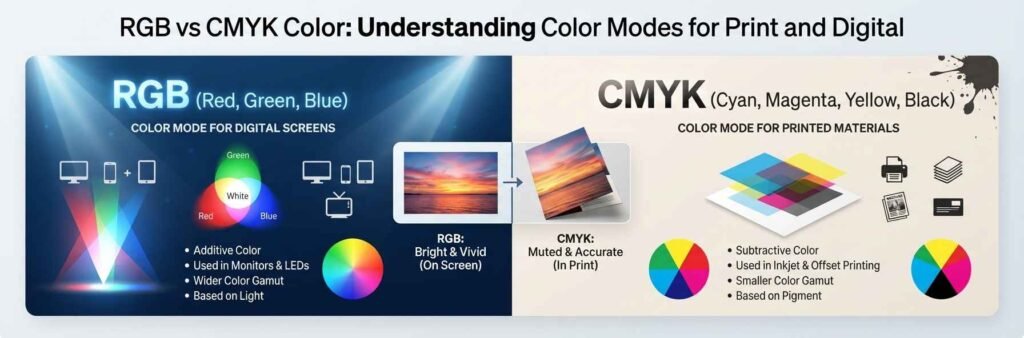

If you have ever made a design on your computer that looked bright and perfect, then got your custom printed boxes and thought this looks all wrong and dull, you have found the difference between RGB and CMYK. This is the single most common problem in all of printing. Almost no printer will tell you about this before you place an order. Most designers also do not explain it well enough. It is not a mistake. It is not a bad printer. It is just how two completely different systems work.
What actually is RGB vs CMYK
There is one simple rule that explains everything. RGB is light. CMYK is ink. That is all. Everything that makes its own light uses RGB. Your phone, laptop, tv, projector and every screen in the world. Everything that is printed on paper or board uses CMYK. There is no exception to this rule. This is the core fact that 90% of people never learn. When people talk about cmyk color vs rgb this is the only thing you really need to remember.
RGB vs CMYK color model
The two systems work in exact opposite ways. RGB works by adding light together. You start with complete black. You add red, green and blue light to make any color you want. If you add all three at full power you get pure white. CMYK works by removing light. You start with pure white paper. You add ink to absorb light. If you add all four inks at full power you get black. They are reverse systems so they can never be exactly matched.
CMYK vs RGB color difference
The most important thing you will ever learn about print is this. RGB can make colors that CMYK can never ever make. Very bright neon green, electric blue, deep red. If you see that color on your screen it will not print. It is physically impossible. It is not that the printer is bad or cheap. That color can not be made with ink on white paper. This cmyk vs rgb color difference is the cause of almost every argument about print quality.
RGB vs CMYK color space
This is the part that causes almost all the frustration between customers and printers.
CMYK color space vs rgb
RGB has a much much larger space. It can hold many more colors than CMYK can ever produce.
RGB vs CMYK color range
If you draw the two ranges as two circles the RGB circle is almost twice as big. Only around 60% of all RGB colors fit inside the CMYK range.
RGB vs CMYK color spectrum
All of the brightest and the most saturated colors live in the part of RGB that is completely outside CMYK. That is why your perfect bright blue always comes out dull purple when it prints.
If you ever wondered how many colors in rgb vs cmyk, RGB can make about 16 million colors. CMYK can make roughly 1.8 million. That is the real number. Most websites will lie and say it is closer. It is not.
Color mode rgb vs cmyk
Almost every design program in the world uses RGB by default. Even Canva. Almost no one knows this. When you make a new design it is set to RGB color mode. When you send that file to a printer their machine will automatically convert it to CMYK. It will do this conversion very badly. It will just guess at the closest color. That is the real reason your colors look wrong. Not a bad printer. A bad automatic conversion.
RGB vs CMYK color profile
A lot of people talk about color profiles and most of it is complete nonsense for 99% of packaging jobs. If you are making boxes for retail you only need one color profile. That is Fogra39. That is the standard all commercial printers all over the world use. Any other profile will give you wrong colors. You do not need any other fancy or custom profile for normal print work.
Common mistakes everyone makes
Most people think if they send a RGB file the printer will fix it. They will not. They will press one button, convert it and send it straight to print. Most people also think they can adjust their screen to see CMYK. You can not. Your screen is RGB. It will always show RGB colors. There is no setting or calibration that will change this. The only way to see what your design will actually look like is print a physical proof.
This difference matters more for packaging than any other type of print. This is the number one complaint we get from new customers. For good consistent results on custom folding boxes you should always work in CMYK from the very start of your design. If you start in RGB you will almost always be disappointed with the final result. For all types of custom boxes this is the single most important tip you will ever get for print.
A lot of new brand owners get very angry when they see the first print. They think the printer did a bad job. They did not. They just did not tell you that rgb color vs cmyk will always look different.
What can you do to get correct colors
There are three very simple rules. First change your design file to CMYK before you pick any colors. Second, do not use very bright neon colors if you want them to print the same. Third, always ask for one single printed proof before you order 5000 rigid packaging boxes. That is it. There is no other trick. There is no magic setting. There is no special profile. That is all you need to do to get the colors you expect.
Conclusion
RGB vs CMYK is not a complicated thing once you understand the basic rule. One is light, one is ink. They will never look exactly the same. If we have to tell you honestly then you do not need to be an expert to get good colors.
All you just need is to know that this difference exists. And make one small change to your file before you send it. Most of the frustration around print colors comes from no one explaining this very simple fact. US Custom Pack always recommends new customers to ask for proof before any large order.
